Scripts and automations
Recurring jobs, transforms, summaries, and local checks are the clearest place to prove the exact-hit lane quickly.
AI Optimizer is a local AI cost control tool for repeat-heavy workflows. It runs a local proxy on your machine so repeated requests can be cached, inspected, and controlled without rebuilding the workflow you already use.
The best fit is not every request. It is the repeated, operational AI work that quietly burns money over time.
Recurring jobs, transforms, summaries, and local checks are the clearest place to prove the exact-hit lane quickly.
Retries, recurring reasoning paths, and repeated tool-driven requests are where duplicate spend quietly accumulates.
CLI runs, prompt testing, and repeat-heavy local workflows are strong candidates because the same request shape often comes back again.
The value is practical, not theoretical: keep the workflow you already have, intercept repeated requests locally, and make the result visible enough to trust.
Point compatible traffic at a local proxy instead of rebuilding your stack around a new platform.
When the same request appears again inside the chosen TTL, AI Optimizer can serve it locally instead of paying upstream again.
Requests, exact hits, partial reuse, and TTL behavior stay visible in one local control layer instead of hiding inside a later bill.
The strongest claim on this site is simple: repeated requests can turn into visible local cache hits. That matters because it is measurable, inspectable, and much easier to trust than vague savings language.
Repeated identical requests can be served locally instead of being sent upstream again at full cost.
The popup and local stats make repeat behavior visible while the workflow runs, which keeps the claim inspectable.
Choose a cache window that fits the repeat pattern instead of hoping provider defaults line up with how your workflow behaves.
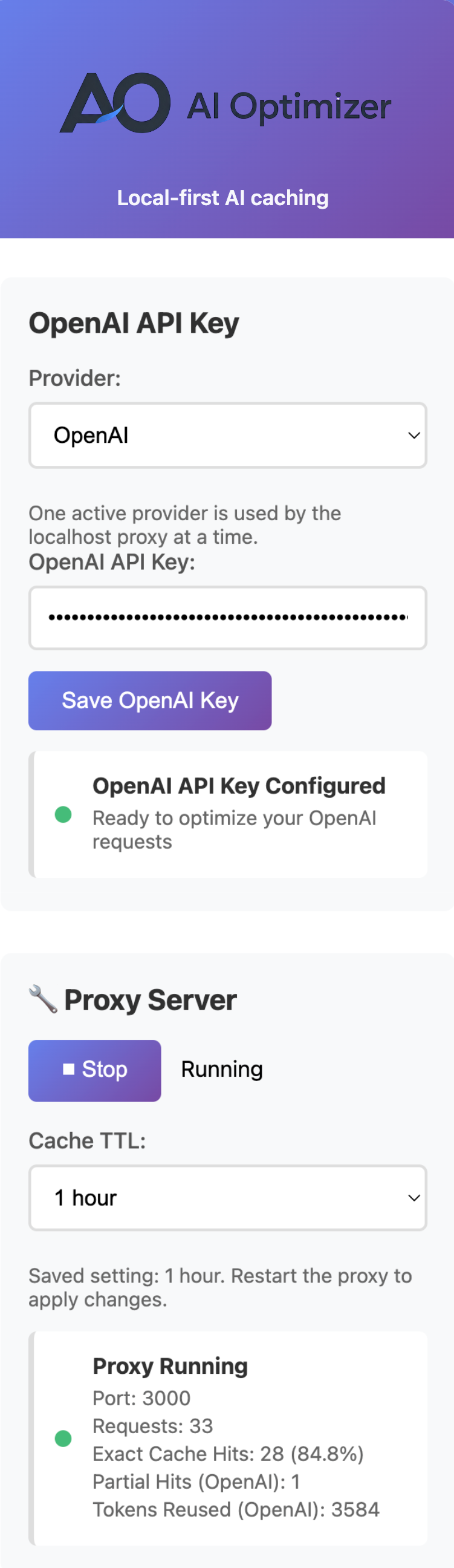
Prove the exact-hit lane on something real, then decide whether it deserves a permanent place in your stack. That is a better trust path than promising broad savings before the workflow is tested.
The adoption path stays simple: route traffic locally, repeat the same request pattern, and watch exact hits and request behavior show up in local stats.
For many OpenAI-compatible tools, the practical setup change is pointing the workflow at http://localhost:3000/v1.
The exact-hit lane only matters when repetition is real, which is why scripts, agents, and recurring jobs are such strong candidates.
The local control layer makes it easier to judge what is happening now instead of reconstructing the story later from provider billing.
AI Optimizer is strongest where repeated work is real. It is not a magic cost-reduction layer for every request.
The best fit is repeat-heavy workflows where identical or very similar request patterns show up over time and deserve a local, controllable caching layer.
OpenAI is the broadest lane today. Anthropic support is focused on chat completions. Google Gemini support is narrower and best for repeat-heavy generateContent workflows.
Provider-side reuse can help, but it is not the same thing as a local exact cache hit you can control directly.
Useful, but still provider-controlled, model-dependent, and not the same thing as a local exact-hit outcome you can verify inside your own workflow.
Local, TTL-controlled, visible in your workflow, and easier to prove in repeat-heavy operational use where the same request shape keeps coming back.
The homepage should open the loop. The deeper pages should defend the wedge.
Start with one repeat-heavy workflow, prove the exact-hit lane, and then decide whether it deserves a permanent place in your stack.